How to Buy Coins on Solana: A Step-by-Step Guide
Learn how to buy coins on Solana in three simple steps.

Solana has turned into a place for coins of all kinds, from stablecoins to meme tokens. Buying coins on Solana is very easy—just three simple steps. This blog post will show you how to do this.
Get a wallet for Solana (Zerion)
While there are many wallets available, most force you to switch between different apps for different chains. Zerion Wallet changes that. It’s one app to manage your entire portfolio on Solana, Ethereum, Base, and 50+ other chains.
Beyond just holding coins, Zerion Wallet for Solana gives you an edge:
- Track PnL: See your realized and unrealized profit and loss for every token.
- Best Rates: Built-in swap aggregation finds the best price across all Solana DEXes.
- Wallet Watching: Follow any Solana address to see what experienced traders are buying.
Here is how to set it up:
- Download Zerion Wallet on iOS, Android, or as a browser extension.
- Create a new wallet. If you already have a wallet (like Phantom or Solflare), you can import your seed phrase to view everything in Zerion.
- Backup your recovery phrase. Write it down and store it securely offline. This is the only key to access your funds.
Now that you have a wallet, it’s time to put some money into it.
Fund your wallet with SOL
Before you can buy any coin on Solana, you need SOL.
SOL is the native token used to pay for transaction fees (gas) and is the main currency you’ll swap for other coins. Fees on Solana are a fraction of a cent, so you don’t need to worry about heavy costs eating into your trade.
You have 3 main options to get SOL:
- Buy directly in Zerion: You can purchase SOL using a card or bank transfer directly within the app. For a detailed walkthrough, read our detailed guide: How to Buy Solana.
- Transfer from an exchange: If you have funds on Coinbase, Binance, or Kraken, you can buy SOL there and withdraw it to your Zerion Solana address.
- Bridge from other chains: You can do this right in Zerion. For more details, read our guide on the Base to Solana bridge. The process is the same for bridging from other chains.
Once SOL is in your wallet, you can buy any coin on Solana.
Buy the coin you want
Once your wallet is funded with SOL, buying coins is simple.
On Solana, trading happens via Decentralized Exchanges (DEXes). You don't need to create an account or verify your identity; you simply swap from your wallet. Zerion integrates Jupiter, the leading aggregator on Solana, to ensure you automatically get the best price by routing your trade through liquidity pools like Raydium, Orca, and Meteora.
Follow these steps to buy a coin:
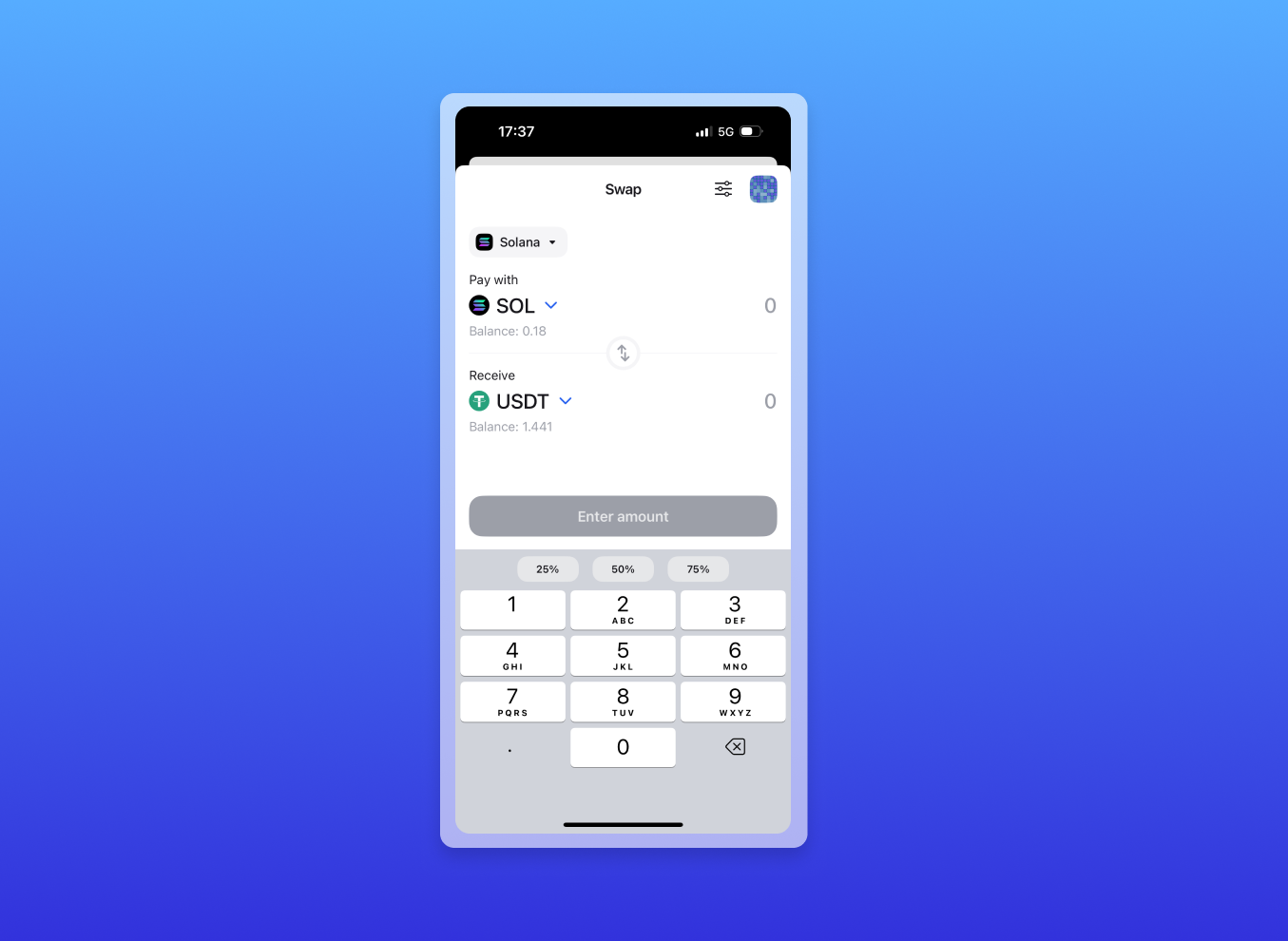
- Open Zerion Wallet and tap the Swap button.
- Select Your Tokens:
- You Pay: Select SOL (or USDC if you have it).
- You Receive: Search for the token you want to buy. Pro tip: If it is a new meme coin, paste the contract address directly to ensure you are buying the correct token.
- Review the Trade: Zerion will show you the exchange rate, the estimated fees, and the minimum amount you will receive.
- Confirm the Swap: Tap to confirm. Because Solana is lightning-fast, the transaction usually settles in seconds.
Once the transaction confirms, the new coins will appear in your portfolio immediately. You can now track its price and decide when to sell—all from the same app.
Ready to start trading?
Download Zerion Wallet and trade on Solana with better tracking and the best rates.