How to Trade Perps on Hyperliquid with Zerion: A Guide
This guide covers what perps are, how to place your first trade, and what to watch out for along the way.


With perpetual futures (aka perps), you can go long or short on BTC, ETH, tokenized stocks, gold, silver, and 250+ other assets with up to 40x leverage. With Zerion, you can do all from the same wallet you already use for swaps and portfolio tracking.
This guide covers what perps are, how to place your first trade, and what to watch out for along the way.
What are perpetual futures?
Perps are derivative contracts that let you speculate on an asset's price without owning it.
Unlike traditional futures, they have no expiry date. You can hold a position as long as your account has enough margin to support it.
Two core mechanics make perps work:
- Long and short positions. Go long if you expect the price to rise, short if you expect it to fall.
- Leverage. Amplify your exposure relative to your deposit. With 10x leverage, a $1,000 deposit controls a $10,000 position. This cuts both ways as gains and losses are both magnified.
Perps use a funding rate mechanism to keep their price close to the spot market. Funding payments are exchanged between long and short traders periodically. They affect your overall PnL while you hold a position: you either pay funding rate or earn it.
How to trade perps on Zerion
Perps are now live in Zerion! Getting started takes just a few steps.
https://x.com/zerion/status/2026319109202538997
Here's the process from deposit to open position.
1. Deposit funds. Add funds to your Perps account in Zerion. Choose the asset and network you want to deposit from. Your deposit is automatically converted into a USD balance for trading.
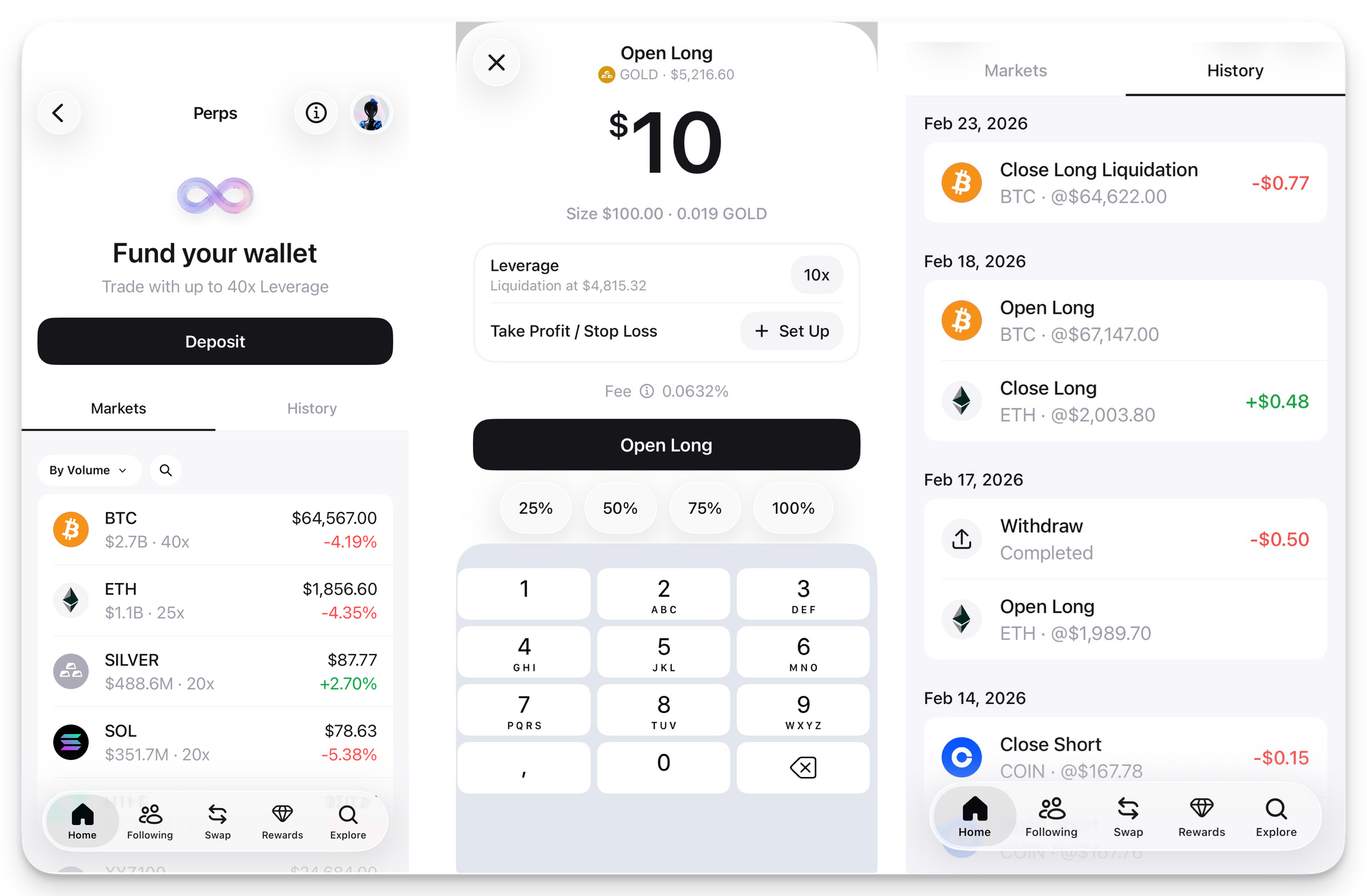
2. Find an asset to trade. Head to the Explore screen to browse available markets. You'll find crypto assets like BTC, ETH, and SOL alongside tokenized stocks, gold, and silver. Tap on any asset to see its current price, available leverage, and recent performance.
3. Open a position. Pick your direction (long or short). Then set your position size and leverage level. Higher leverage means larger exposure but also a closer liquidation price, so size your trades carefully.
4. Set take profit and stop loss. Before confirming, define your exit levels. Take profit closes your position automatically when it hits a target gain. Stop loss caps your downside at a level you're comfortable with. Both can be set by PnL percentage or absolute price.
5. Monitor your trades. Go to the Perps screen to track open positions, review your trade history, and adjust margin or exit levels as needed.
Key terms for perps trading
If you're new to perps, a few concepts are worth understanding before you start.
- Margin — The collateral backing your trade. You can add or remove margin to adjust your liquidation price.
- Liquidation price — The price at which your position is automatically closed to prevent further losses. This shifts when you change your margin or position size.
- PnL (Profit and Loss) — Your unrealized or realized gain or loss, based on the difference between your entry price and the current market price.
- Funding payments — Periodic payments exchanged between long and short holders to keep perp prices aligned with the spot market.
- Size — The total value of your position, including leverage.
Managing risk with leverage
Leverage amplifies everything.
A 10x long position gains 10% when the underlying asset moves 1% in your favor. But it also loses 10% on a 1% move against you.
A few practical guidelines:
- Start with lower leverage. Even 2x–5x adds meaningful exposure without putting your margin at immediate risk.
- Always set a stop loss. Markets move fast, especially in crypto. A stop loss gives you a defined maximum downside.
- Watch your liquidation price. If the market approaches it, you can add margin to push it further away—or close the position entirely.
Fees
Zerion Perps runs on Hyperliquid, the leading onchain perps DEX with deepest liquidity.
Each trade incurs a Zerion fee on top of Hyperliquid's 0.0432% base fee: 0.04% or 0.02% if you have Zerion Premium. Withdrawals carry a $1 fee applied by Hyperliquid. Withdrawn crypto is transferred on the Arbitrum network.
Start trading perps on Zerion
Perps bring a new dimension to your Zerion wallet. You can go long, short, and get leveraged exposure across hundreds of assets without leaving the app. Deposit funds, pick a market, and open your first position.
Download Zerion Wallet on iOS or Android.