
Filed an IRS Extension? Use Zerion API and Claude to Get Crypto Taxes Ready
Here's how to use Zerion API and Claude Code to get transactions from EVM and Solana and prepare your taxes.


If you filed a tax extension this April, you're not alone. And you're not behind. The extended October 15 deadline gives you time to get your records in order. The question is how to do this without breaking a bank or spending weeks.
In this post, we'll walk through how to use Zerion API and Claude to pull your transactions across 40+ chains and organize everything into a tax-ready summary. This isn't tax advice. But it's a practical workflow for turning blockchain data into something you (or your accountant) can work with. And it will save you countless (billable) hours.
Why 1099-DA isn't enough
Starting with tax year 2025, centralized exchanges and other custodial platforms are required to issue Form 1099-DA.
This is a big step. Exchanges can now report your cost basis, acquisition dates, and holding periods.
But there is a big blind spot: it only covers transactions that happen on the exchange itself.
If you’re active onchain, use self-custodial wallets and DeFi, you're on your own. Trades on DEXes, liquidity pool deposits, staking rewards, and perps are all taxable events that no platform will report for you.
This is where crypto wallet data APIs come in.
Instead of manually exporting data from dozens of different block explorers, you can query a single API that aggregates and normalizes transactions across every chain you've used.
Zerion API is perfect for that.
What Zerion API gives you
Zerion API provides a unified view of any wallet's activity across 40+ EVM chains and Solana. For tax preparation, the key data it provides is:
- Multichain transaction history. Every trade, send, receive, deposit, withdrawal, claim, and mint associated with your wallet. Each transaction is already classified by type and includes USD values at the time it happened.
- Profit and loss per asset. Realized gains, unrealized gains, cost basis, and total fees, broken down for each token. This is calculated using FIFO (First In, First Out), the standard method accepted by the IRS. This is essentially the data your accountant needs to calculate capital gains.
- Current positions. A snapshot of everything you hold now, useful for documenting unrealized positions at year-end.
- DeFi positions across 8,000+ protocols. Including staked assets, liquidity pool positions, lending deposits, and unclaimed rewards.
Thanks to tools like Claude Code, you don't need to be a developer to use any of this.
Setting up Claude Code with Zerion
The easiest way to get started is with Claude Code, Anthropic's AI coding agent available with paid subscription plans.
1. Add Zerion CLI and MCP
You don't need to manually install anything or learn API endpoints, just ask Claude Code to set it up.
Create a new folder, open Claude Code in it and simply ask:
Claude Code will read the documentation, install the Zerion CLI and configure the Zerion API MCP server connection.
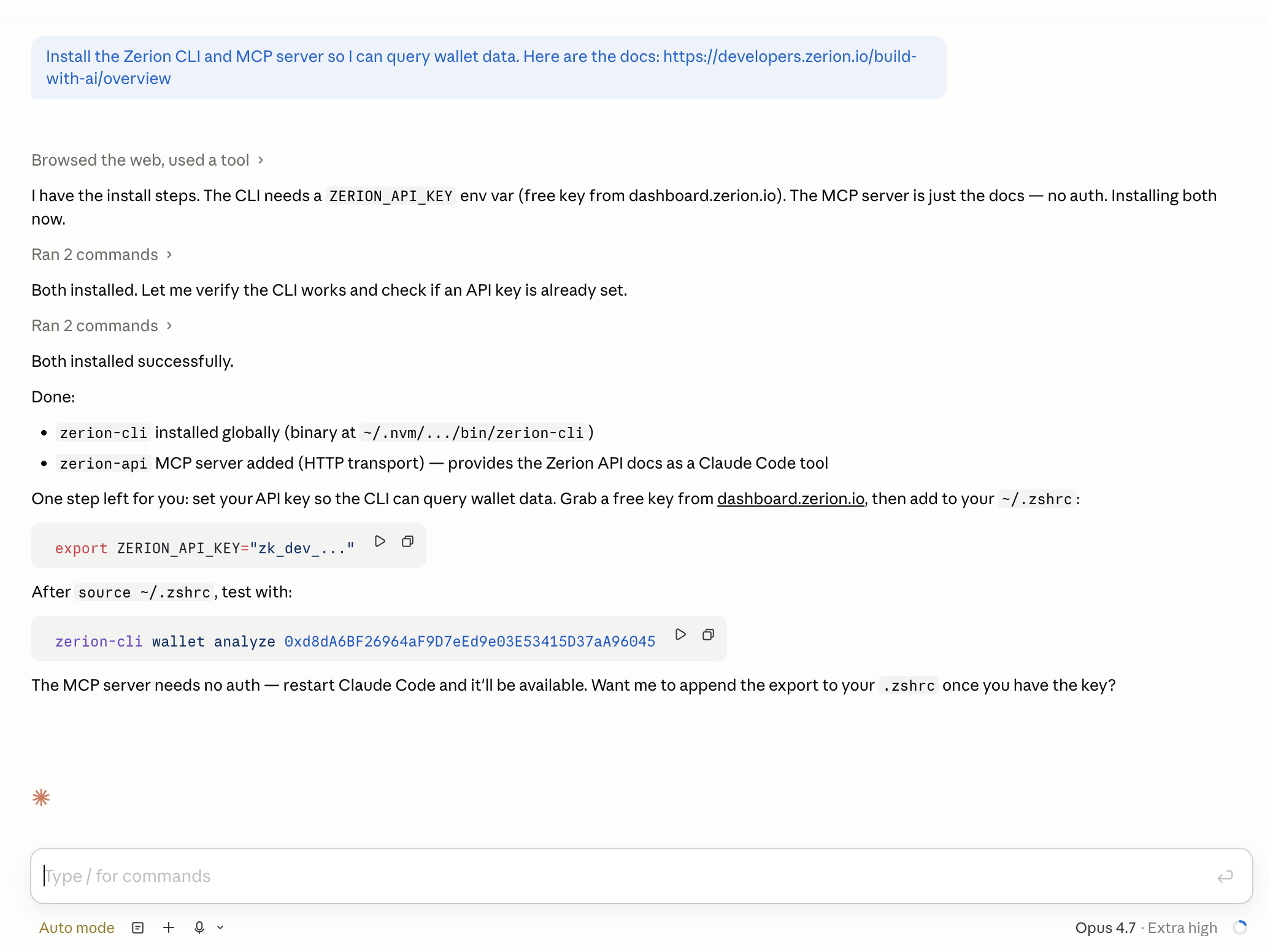
2. Add Zerion API key
To use Zerion API, you need an API key. Just grab a free key from the Zerion developer dashboard.
Once you get your key, create a new .env file in your working folder. Add your key to the file:
ZERION_API_KEY=zk_0ba*****
Once set up, Claude Code can query any Zerion endpoint directly.
Getting data with Zerion API and Claude Code
With the tools connected, you can ask Claude Code to do the entire data-gathering workflow in natural language.
Using Zerion API, prepare my crypto tax data for 2025 (Jan 1 – Dec 31).
My wallet addresses are:
{ADDRESS}
{ADDRESS}
1. Get all my transactions for the year. Classify them into: capital gains/losses (trades, swaps), income (staking rewards, airdrops, claims), and non-taxable (transfers between my own wallets, approvals). When unsure, flag any transactions, do NOT make assumptions. Use this endpoint: https://developers.zerion.io/api-reference/wallets/get-wallet-transactions
2. For each token that appears in the transactions, get the PnL data so we have realized gains, cost basis, and average prices. Use date (`since` and `till`) filters to get PnL for last year only. Use this endpoint: https://developers.zerion.io/api-reference/wallets/get-wallet-pnl
3. Check my DeFi positions for any unclaimed rewards. Use this endpoint with `complex_only` filter: https://developers.zerion.io/api-reference/wallets/get-wallet-fungible-positions
4. Put everything into a clean CSV files that I can give to my accountant or tax software.
5. Give me a summary.
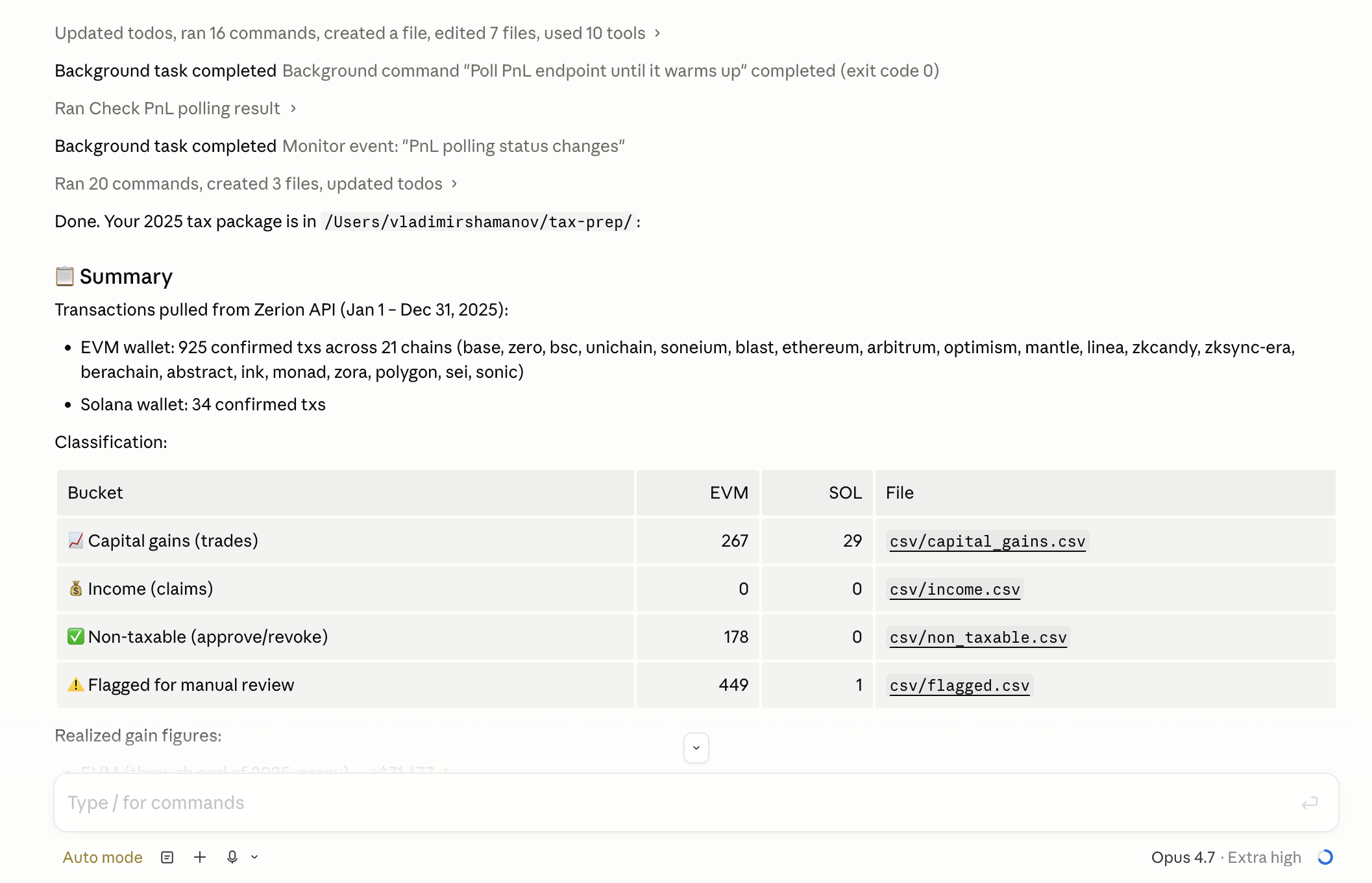
Claude Code will handle this step by step: it'll call the transactions endpoint with the right date filters, identify which tokens were involved, then call the PnL endpoint for each of those tokens to get the gains and losses breakdown. It knows how to paginate through large histories, handle multiple chains, and format the results.
The result: Complete onchain data for taxes
Without any handholding, Claude Code will figure out how to use Zerion API and get your task done.
The exact implementation will vary. It will likely write Python scripts and fetch data using Zerion API. It will then save everything in CSV files and create a summary in Markdown. Everything will be saved in your working folder.
In my case, Claude Code worked for about 20 minutes.
Didn't ask any questions. Did it all in one shot.
What Claude handles well (and what to double-check)
Claude is good at using tools like Python to manipulate data.
Zerion API makes it even easier with labels and normalized structure.
But in its high-level analysis, Claude might still hallucinate, which is why you should always review the output.
A few areas where you'll want to double-check:
- Transactions involving wrapped/unwrapped token conversions (like ETH to WETH),
- Complex DeFi positions with multiple entry and exit points,
- Aany transaction Claude flags as ambiguous.
DeFi positions in particular need a human call on the tax treatment. With Zerion API, Claude will correctly fetch liquidity pool rewards, staking yields, and lending interest. But its tax treatment will depending on how your tax professional (or tax software) interprets current guidance.
Putting it all together
The workflow is straightforward:
- Set up Claude Code with Zerion API (one-time, takes a few minutes),
- Ask it to pull and organize your data for the tax year,
- Review the output.
Then hand the clean summary to your accountant or import it into your tax software.
The result is a structured, human-readable record of your crypto activity. It’s the data foundation for filling your tax report.
Get started
The extension deadline is October 15. That's six months to get your records straight and with the right tools, the actual work takes an afternoon, not weeks.
Sign up for a free Zerion API key and check out the Build with AI docs to connect Claude Code in minutes.
This post is for informational purposes only and does not constitute tax, legal, or financial advice. Consult a qualified tax professional for guidance specific to your situation.