How to Add Liquidity to a Solana Token
Learn how to add liquidity to a Solana token, what to expect when providing liquidity, and how to manage your LP positions directly in Zerion.
 Vladimir Shamanov
2 min read
Vladimir Shamanov
2 min read
Adding liquidity on Solana isn’t just for advanced DeFi users anymore. With today’s tools, anyone can support their favorite token, earn fees, or set up a gradual selling strategy. In this guide, you’ll learn exactly how to add liquidity to a Solana token, what to expect when providing liquidity, and how to manage your LP positions directly in Zerion.
Steps to Provide Liquidity on Pumpswap
While there are many Solana DEXes, we’ll use Pumpswap, the DEX by Pump.fun to illustrate the process of adding liquidity. These steps are the same on other DEXes but the interface might be slightly different.
- Open Zerion Wallet for Solana and navigate to the built-in browser
- Enter https://swap.pump.fun/ in the URL field
- Connect your wallet
- Tap [deposit/create]
- Select the tokens pair for which you want to provide liquidity
- Sign the transactions
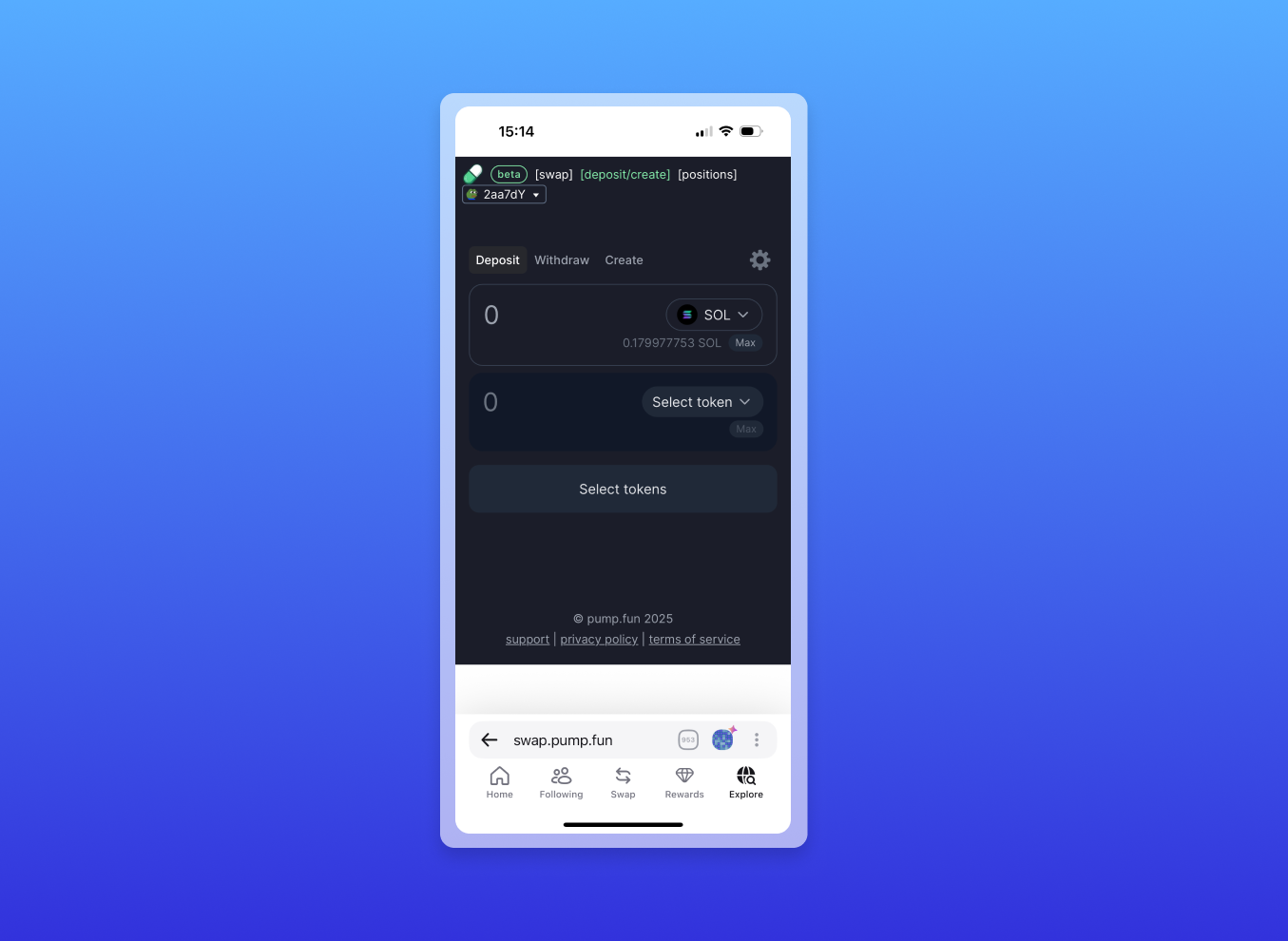
Now you’re a liquidity provider for this token and will earn trading fees.
How to Manage Solana LP Positions
After providing liquidity, your LP tokens stay in your wallet. You can see them by connecting to Pumpswap and tapping [positions].
When you want to remove liquidity, simply return to Pumpswap, connect your Zerion Wallet, and choose [deposit/create] and then ‘withdraw’. You’ll sign a couple of transactions, and your tokens will be returned to your wallet instantly.
Why Provide Liquidity to a Solana Token
People provide liquidity for several reasons.
Earn LP fees
Liquidity providers earn a portion of the trading fees generated by the liquidity pool. The more activity and volume the token gets, the more fees your LP position can accumulate. It’s a simple way to put idle assets to work.
Support the token
Nobody can buy a token if there is no liquidity. Creators must provide liquidity to the pool for others to buy.
Other holders who have lots of tokens might also choose to provide liquidity to help the token grow by making it more accessible to buyers.
Gradually sell the token
Providing liquidity can also act as a smoother selling strategy.
Instead of market-selling large amounts at once, LPing allows you to exit gradually as traders interact with the pool. This often gives a better average execution price, puts less impact on price, and even earns trading fees in the process.
Conclusion
Adding liquidity to a Solana token is a straightforward process: pick a platform like Pumpswap, connect Zerion Wallet, choose your token pair, and sign the transactions. Once your LP tokens are in your wallet, Zerion makes it easy to track the value, monitor fees, and manage your position over time.
If you want the smoothest way to interact with Solana dapps and track all your tokens, install Zerion Wallet for Solana and start exploring.

Written by
Vladimir ShamanovVladimir has been working full-time in blockchain and crypto since 2018. Before that, he was in financial communications. He holds a BSc in Management from the LSE.
More from Vladimir Shamanov