How to Get All Token Positions for Any Wallet (One API Call)
Learn how to fetch all token positions for any address on Solana and all major EVM chains with one call to Zerion API

When you connect a wallet to an app, you expect to see your tokens. Building that view can mean querying each chain, looking up token icons, joining prices, and removing spam. Lots of work before there is anything to show.
Zerion API’s wallet token positions endpoint returns that data in one request. Pass any EVM or Solana address to get its directly held tokens with balances, prices, and icons, ready for your UI.
Here’s how to make your first request and turn the response into a list of token positions.
Token positions in Zerion API
Zerion API provides onchain wallet data across EVM chains and Solana for wallets, portfolio trackers, and other apps. Teams at Kraken, Privy, and others build with it.
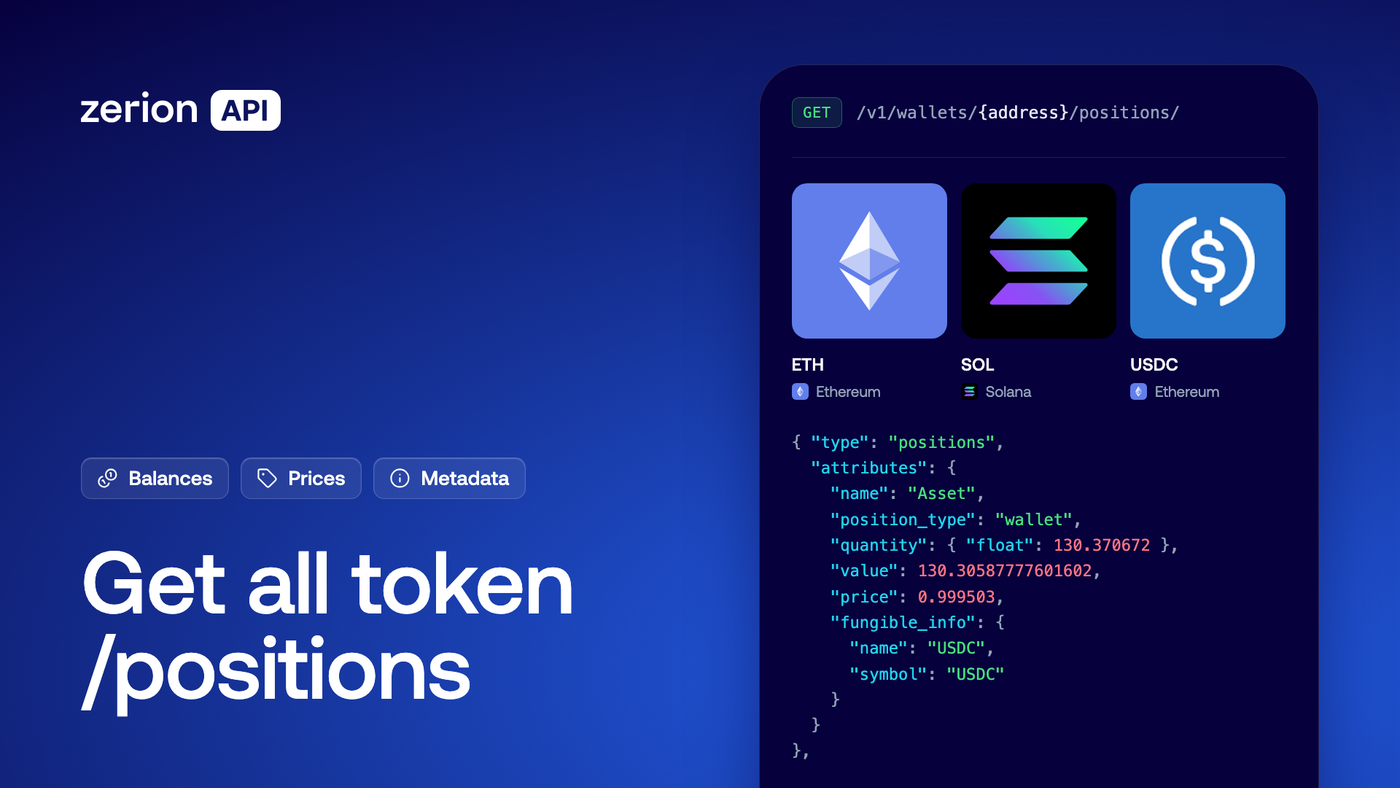
Zerion API’s token positions endpoint returns native coins and tokens held directly by a wallet, with balances, prices, token icons, and other metadata in one request. You can use the response to build a token list without querying each chain or fetching prices and metadata separately.
1. Get a free Zerion API key
Create a free API key in the Zerion dashboard. The quickstart covers setup.
You’ll also need the wallet address you want to query. It can come from a connected wallet or an embedded wallet provider such as Privy, Turnkey, or Dynamic.
2. Fetch all token positions
Replace YOUR_API_KEY and the example wallet address, then run:
curl -u "YOUR_API_KEY:" \
  "https://api.zerion.io/v1/wallets/0x42b9df65b219b3dd36ff330a4dd8f327a6ada990/positions/?currency=usd"
The response includes all matching positions across supported chains for that address. There’s no chain list to maintain and no pagination loop: the positions arrive together in the data array.
By default, you get native coins and fungible tokens held directly in the wallet. The highest-value positions come first. Prices and values are denominated in USD. Spam tokens are filtered out.
Both EVM and Solana addresses use the same path. Authentication and the response schema stay the same. You can reuse your token-list logic across EVM and Solana wallets. Each request queries one address.
This guide covers directly held tokens. For DeFi protocol holdings, use the separate DeFi positions guide; Solana DeFi positions are not yet supported.
3. Turn the response into a token list
Each position contains all the information you need for a wallet balance screen:
- Balance: display-ready quantities alongside the raw onchain amount.
- Valuation: unit price, total position value, and 24-hour changes.
- Token details: name, symbol, logo, links, and other metadata.
- Chain: the network where the position is held.
Here is an example of a response:
{ "type": "positions",
  "attributes": {
    "name": "Asset",
    "position_type": "wallet",
    "quantity": { "float": 130.370672 },
    "value": 130.30587777601602,
    "price": 0.999503,
    "fungible_info": {
      "name": "USDC",
      "symbol": "USDC"
    }
  }
},
You can display the response data without any additional lookups. If your interface groups the same token across chains, use relationships.fungible.data.id to combine positions into one row, such as a single USDC holding across chains.
The endpoint reference has the complete response schema and code examples.
Adjust the request to your app
The default request gives you a full token list. Built-in filters help you define the response to what your screen needs:
- A chain-specific screen: use
filter[chain_ids]=base,arbitrum. By default, Zerion API returns data across all supported chain at no additional cost. - A token watchlist: pass Zerion fungible IDs through
filter[fungible_ids]to get positions for specific tokens. - A different denomination: set
currency=eurorcurrency=eth.
See the filtering and currency docs for the full options. Large wallets can return thousands of positions, so requesting only the chains or tokens you need can reduce the response.
Build token positions with Zerion API
In this post, we saw how easy it is to build wallet balance and other features with token positions. You make one call to Zerion API’s /positions endpoint and get everything you need.
The same token data can power a portfolio screen, a wallet balance view, or an AI agent that needs to know what an address holds.
Create a free Zerion API key and test it with your own wallet address.

Written by
Vladimir ShamanovVladimir has been working full-time in blockchain and crypto since 2018. Before that, he was in financial communications. He holds a BSc in Management from the LSE.
More from Vladimir Shamanov