How to Bridge to Arc Mainnet
Here's how to bridge to Arc mainnet with Zerion

Arc, the new L1 chain by Circle, uses USDC to pay transaction fees. So if you move USDC to Arc, you can also use it to cover fees without buying a separate gas token.
Here’s what to know before bridging USDC to Arc and how to use Zerion’s Bridge to find the best routes.
Before you bridge
Arc’s gas documentation gives a design target of roughly 0.001 USDC per ERC-20 transfer. The final fee depends on the transaction and network conditions. Important: always keep some USDC on Arc for gas.
Finality and bridge time are different. Arc itself has fast transactions. But a cross-chain transfer still needs processing on the source chain, so it can take some time before funds arrive on Arc.
Remember: anyone can use the Arc network. Anyone can transact and deploy applications. So beware of scammers.
How to bridge USDC to Arc with Zerion Wallet
Zerion’s Bridge compares routes across many providers and lets you review a quote without visiting each bridge separately.
In the Zerion web app
- Open the bridge tab in Zerion web app and connect your wallet.
- Choose your source network, then Arc as the destination.
- Enter your token and amount under Send. Select USDC under Receive.
- Review the received amount, fees, and estimated time. Approve token access if prompted.
- Click Sign and send.
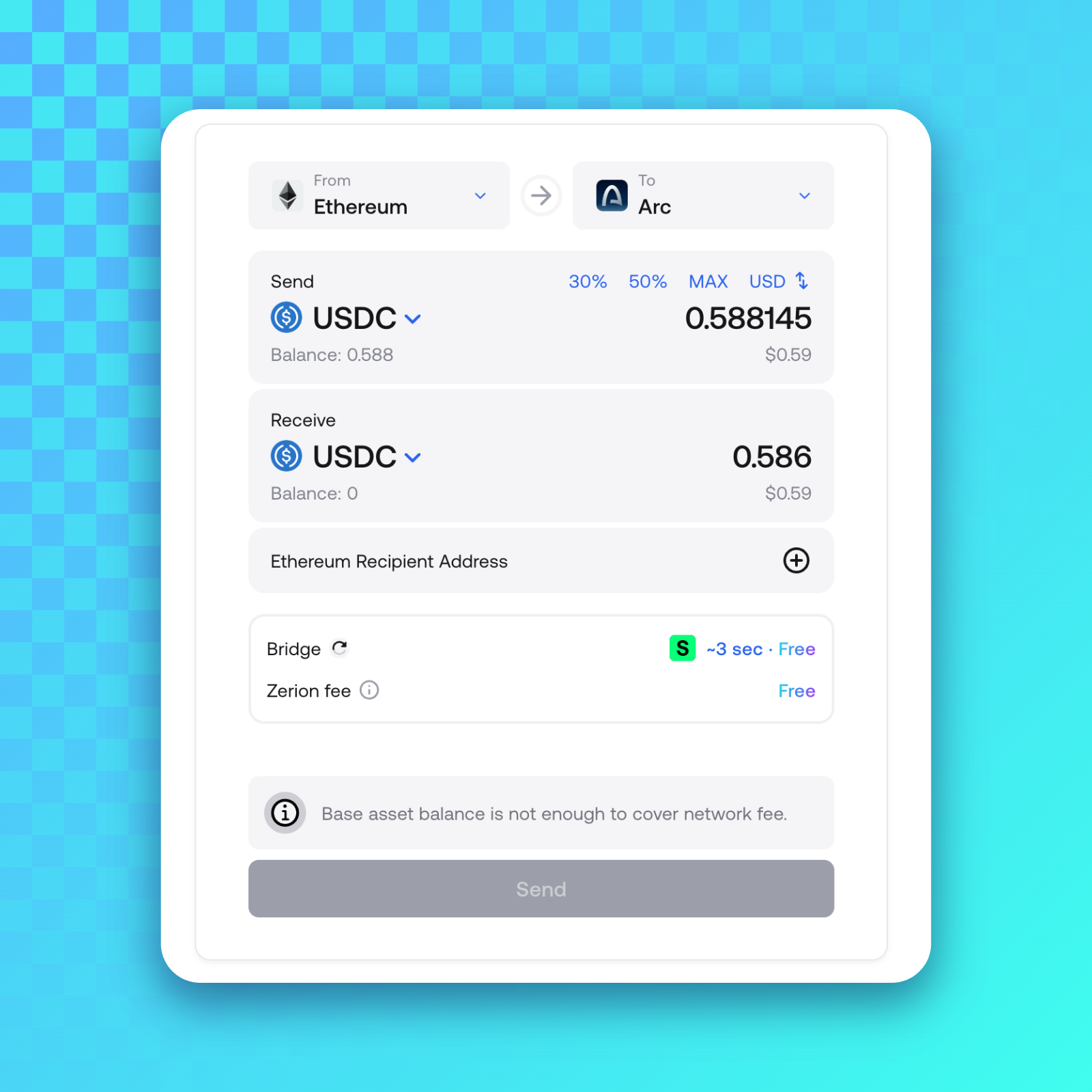
That’s it. Depending on the speed of the source chain, your assets will appear on Arc in a few seconds to a few minutes.
In Zerion Wallet on mobile
- Open Zerion, tap the swap button.
- Select the source network and asset in “Pay with”.
- In “Receive”, click on the globe, then type “Arc”, and select it.
- Check the quote and approve token access if prompted.
- Tap Swap now, then Confirm.
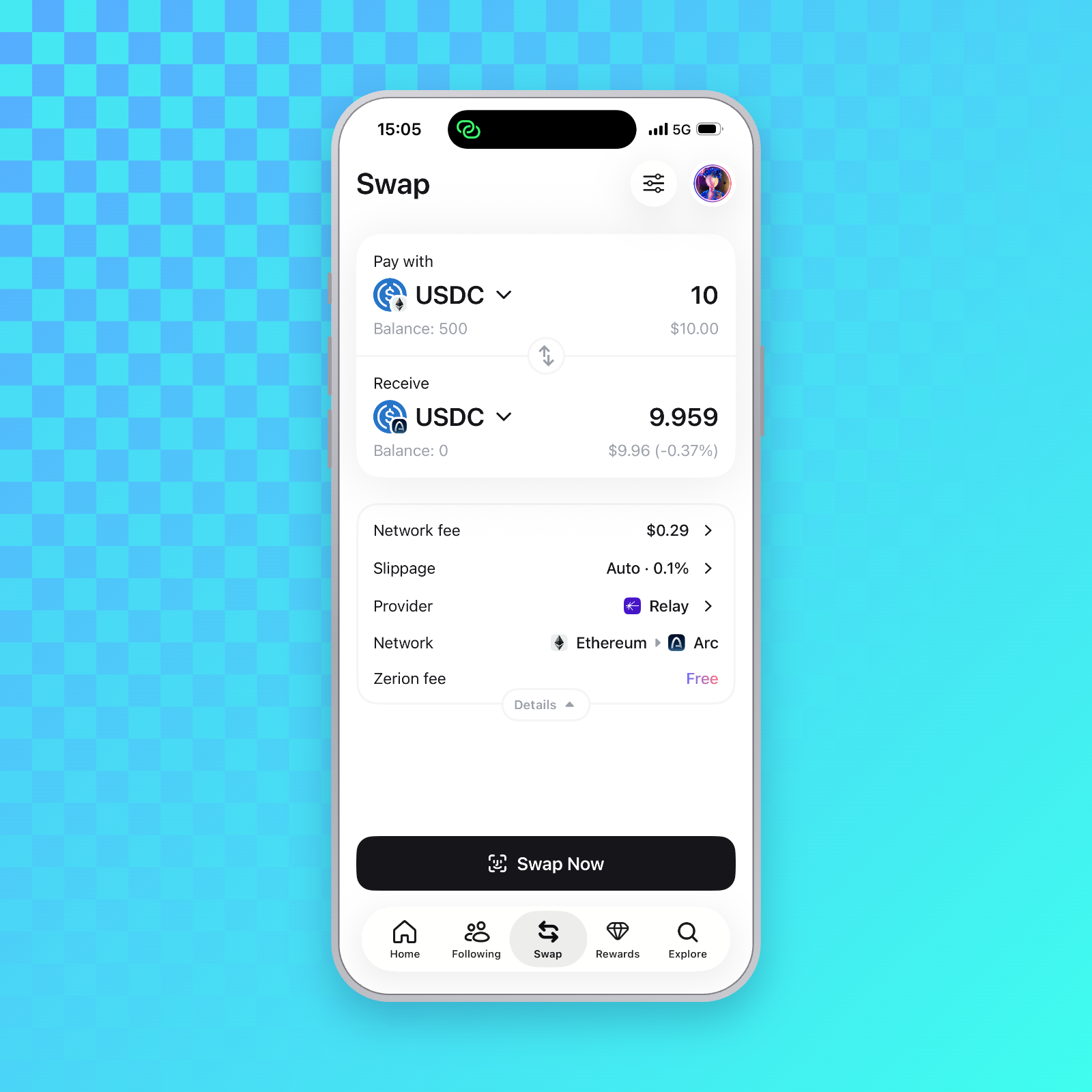
Use the time estimate shown for your route. While Arc is fast, the chain from which you’re sending can be much slower.
Fees and the amount received can vary with route availability and liquidity, particularly around launch.
Find your Arc balance
With Arc portfolio support enabled, your Arc assets should appear alongside your other networks in Zerion.
Filter the portfolio by Arc to see what you hold there. Then open transaction history to see activity such as tokens received.
To send USDC, select it on Arc, enter the recipient and amount, and review the transaction. The fee comes from the same USDC balance, so leave enough to cover it.
The data behind your Arc portfolio
Zerion API’s planned day-one Arc coverage includes balances, prices, transaction history, and webhooks through the same endpoints used for 42+ EVM chains and Solana.
Builders can use that wallet data without running their own node or chain indexer. Get a free Zerion API key and see it in action.
Get ready to bridge
Download Zerion for iOS, Android, or your browser, then check Bridge for available Arc routes.
Frequently asked questions
What is Arc?
Arc is an EVM-compatible Layer 1 designed by Circle for financial applications. Its design includes USDC gas, sub-second deterministic finality, and opt-in privacy controls.
Do I need a special gas token for Arc?
No. Arc uses USDC for gas. You may still need the source chain’s gas token to bridge funds into Arc.
Is USDC on Arc native USDC?
CCTP transfers mint native Circle-issued USDC on Arc. Check that your selected bridge delivers USDC on Arc before confirming.
How long does bridging to Arc take?
Check your bridge quote for the current estimate. Timing depends on the source chain and bridge provider.
Can I see my Arc balance in Zerion?
Yes, Arc portfolio coverage is live across Zerion apps. You can see all your tokens on Arc in Zerion web app and in Zerion wallet on mobile. You can also query Arc portfolios with Zerion CLI.

Written by
Vladimir ShamanovVladimir has been working full-time in blockchain and crypto since 2018. Before that, he was in financial communications. He holds a BSc in Management from the LSE.
More from Vladimir Shamanov