How to Get All NFTs Owned by an Address Across All Major EVM Chains
Learn how to get all NFTs owned by a wallet address across chains with Zerion API, including images, collection details, values and spam filtering.

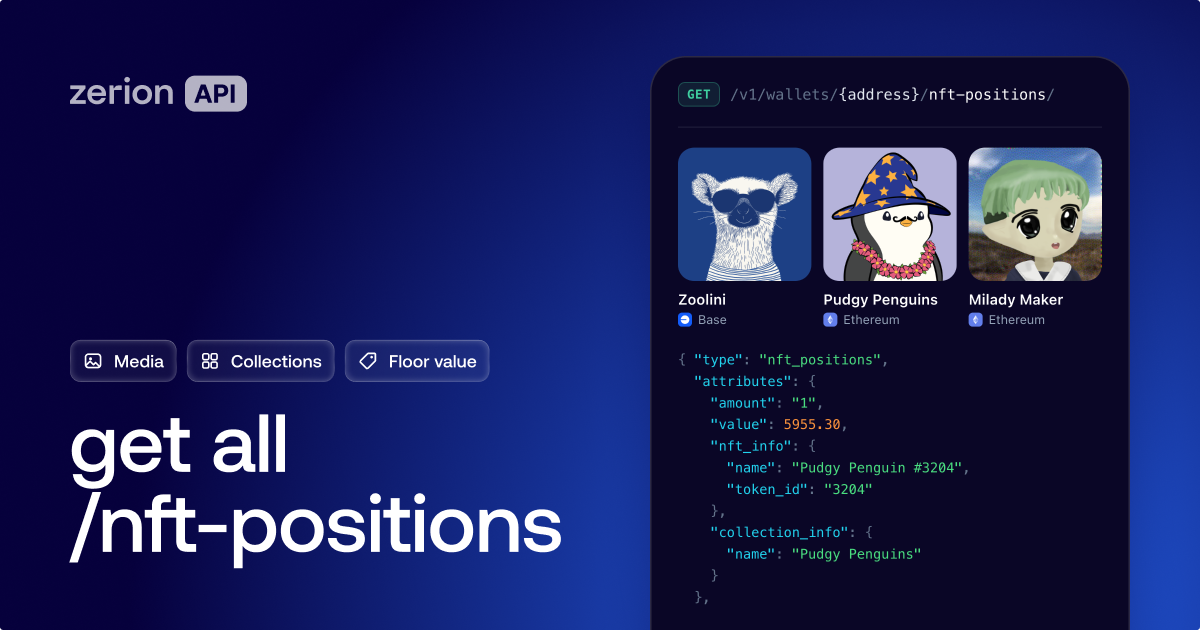
To get all NFTs owned by a wallet address, you’d usually need to interact with each contract on each chain. Alternatively, you can just use Zerion API, which brings everything together. With one call to /nft-positions, you can get all NFT holdings, complete with images, collection info, and floor-based values.
The process is straightforward: get a Zerion API key, query with the wallet address, and get the response. This guide walks through that process in more detail.
Where NFTs are stored
Each NFT has its own contract.
So getting all NFTs for an address means querying contracts across every chain.
The same 0x address can hold NFTs on Ethereum, Base, Zora and Robinhood Chain. A request limited to Ethereum will leave out the rest, even though the address is identical.
You also need to account for quantity. ERC-721 NFTs are unique, with an amount of one. ERC-1155 holdings can have an amount greater than one. Counting the records in a response is different from counting the units held.
A useful response includes the token ID, contract address, media, traits, collection and value.
Why can’t you just ask the blockchain for a wallet’s NFTs?
There is no standard “list all my NFTs” RPC call.
The default workaround is to build an ownership index and enrich its results.
Doing this yourself means working through several steps on every chain:
- Scan
Transfer,TransferSingleandTransferBatchlogs from the chain’s history - Track transfers to determine current ownership and quantities
- Call
tokenURIorurito find each NFT’s metadata - Fetch and parse the metadata JSON, including files on IPFS or Arweave, and cache the media
- Detect spam collections and source floor prices for valuation
This index is only the first part. To be useful, a list of contract addresses and token IDs still needs names, images, collection data, and prices.
This can mean weeks of indexing work per chain.
An NFT API like Zerion handles that work and exposes the result through a set of endpoints.
Which Zerion API NFT endpoint should you use?
Zerion API offers /nft-positions for individual NFT holdings, /nft-collections for NFT collection groups, and /nft-portfolio for the wallet’s total NFT value.
Zerion API's three wallet-focused NFT endpoints let you choose the level of detail:
GET /v1/wallets/{address}/nft-positions/: NFT holdings with media, traits, collection, floor price and value. Use it for listing every NFT a wallet owns.GET /v1/wallets/{address}/nft-collections/: Collections held, including nfts_count and total_floor_price. Use it for a gallery grouped by collection.GET /v1/wallets/{address}/nft-portfolio: Total NFT value, with a chain breakdown. Use it for an NFT portfolio total.
Additionally, you can use NFT-focused endpoints to enrich the results:
GET /v1/nfts/{id}: One NFT’s media, traits and collectionGET /v1/nfts/: NFT details through batch lookup by reference
Now that we've covered the overall structure, we can review the steps to get all NFTs.
How do you retrieve every NFT a wallet owns, step by step?
Step 1: Get a free API key
Create a Zerion API key at dashboard.zerion.io. Zerion API uses HTTP Basic authentication: your key is the username, and the password is empty.
Step 2: Make the first request
Run the cURL command below with your key and the wallet address you want to inspect.
  -H "accept: application/json" \
  "https://api.zerion.io/v1/wallets/0xd8dA6BF26964aF9D7eEd9e03E53415D37aA96045/nft-positions/?currency=usd"
The path takes a 0x address. If you have an ENS name, resolve it to an address before making this request.
Step 3: Read the response fields
Each item in data describes an NFT holding. The main fields are:
attributes.nft_info: Name, token ID, contract address and media.attributes.collection_info: Collection details.attributes.amountandattributes.value: Quantity held and floor-based value.relationships.chain.data.id: The chain where the NFT is held.
Step 4: Follow every pagination link
A wallet’s holdings may span several pages. Collect the items in data, request the URL in links.next and repeat until there is no next page.
Apply the same indexing-retry logic to each request. See the NFT portfolio recipe for more on building the holdings view.
How do you get NFTs on Base, Robinhood Chain or Ethereum?
By default, Zerion API returns NFTs that an address holds across all supported chains.
To narrow results to a specific chain, use filter[chain_ids] and set to the chain you need. For multiple chains, pass a comma-separated list, such as filter[chain_ids]=base,robinhood.
How do you filter out spam NFTs?
Airdropped scam NFTs plague most active wallet addresses, especially on Base, BSC, and other chains with cheap gas.
Zerion API excludes spam NFT collections by default, so you do not need to configure a spam filter for the requests above.
See the spam filtering documentation for more about Zerion API’s approach.
How do you group NFTs by collection for a gallery?
Use Zerion API’s NFT collections endpoint to group a wallet’s holdings by collection. The response includes NFT counts, floor-based values, and collection artwork.
Display these groups in the gallery overview, then show the individual NFTs within each collection.
What can you build with wallet NFT data?
Zerion API’s NFT endpoints can support portfolio interfaces, galleries, access checks, eligibility checks, and AI agents.
- Wallet or portfolio app: Display holdings alongside their floor-based values. Set
currencyto match the portfolio view. - NFT gallery: Group holdings by collection and display collection artwork. Use
include=nft_collections. - Token-gated app: Check whether a wallet holds an NFT from the required collection. Use
filter[chain_ids]for the relevant network. - Airdrop or allowlist eligibility: Inspect holdings against collection-based requirements. Set
page[size]and follow everylinks.next. - AI agent: Give the agent the data to answer questions like “what NFTs does this wallet own?” with holdings and chain context.
For agent integrations, see Zerion CLI and x402 pay-per-request access.
Start building with Zerion API
Zerion API’s NFT endpoints are the easiest way of getting all NFTs held by a wallet address.
With just one call, you can fetch a wallet’s NFT holdings, complete with content, metadata, collection info, and prices. Without any additional enrichment needed, you can immediately use that data to build a gallery, portfolio view, or collection-based access check.
Create a free Zerion API key and run your first request with a wallet address.
Frequently asked questions
What is the easiest way to get all NFTs owned by a wallet address?
Call Zerion API’s GET /v1/wallets/{address}/nft-positions/ with the wallet address. It retrieves holdings across all supported chains.
Can I get NFTs from multiple chains in one call?
Yes. In Zerion API, omit filter[chain_ids] for all supported NFT chains, or pass a comma-separated list. Additional requests may be needed for pagination.
How do I get NFTs on Base or Robinhood Chain?
Use Zerion API’s NFT endpoint with filter[chain_ids]=base for Base or filter[chain_ids]=robinhood for Robinhood Chain. To query both, use filter[chain_ids]=base,robinhood.
Does the endpoint return ERC-1155 NFTs?
Yes. Zerion API returns both ERC-721 and ERC-1155 holdings, and amount shows the quantity held.
How do I hide spam NFTs?
Zerion API filters and hides spam NFT collections by default. No additional spam-filter parameter is needed for these requests.
Can I get the value of a wallet’s NFTs?
Yes. In Zerion API, use value for a position, total_floor_price for a collection, or the nft-portfolio endpoint for the wallet’s NFT portfolio value.

Written by
Vladimir ShamanovVladimir has been working full-time in blockchain and crypto since 2018. Before that, he was in financial communications. He holds a BSc in Management from the LSE.
More from Vladimir Shamanov