How to Track Lending, Staking, LP, and Vault Positions
Learn how to track DeFi positions such as lending, staking, liquidity provider (LP), and vaults. Track them all using the Zerion app, the Zerion CLI, and the Zerion API.
 Vladimir Shamanov
5 min read
Vladimir Shamanov
5 min read
If you’re active in DeFi, most crypto wallets will give you the wrong portfolio value. Or even worse, they might just not show those positions at all.
The tokens are there. The problem is that none of them are really tokens. They're receipts for positions held inside protocols. And most wallets only know how to read regular token balances.
This guide covers the four DeFi position types you'll run into: lending, staking, liquidity provider (LP), and vault. And three ways to track all of them: the Zerion app, the Zerion CLI, and the Zerion API.
Why DeFi positions don't show up in your wallet
A token balance is one number. A DeFi position is a claim on a protocol, usually with several moving parts. These might include principal or collateral, debt, yield and/or interest accrued.
Protocols effectively hand you a receipt token. Deposit USDC into Aave and you get aUSDC. Stake ETH with Lido and you get stETH. Provide liquidity on Uniswap v3 and you get an NFT.
Wallets and block explorers see the receipt. But most don't see the position behind it.
There are now thousands of DeFi protocols across 40+ chains. And every protocol encodes its receipts differently. This complexity keeps increasing every day.
We can try to simplify by looking at different types of DeFi positions.
The four position types, and what each one needs you to track
Lending positions
Collateral supplied to Aave, Compound, Morpho, or Spark, and debt borrowed against it. Lending is two-sided: a supply position earning yield, and a loan accruing interest in the other direction.
Staking positions
Native staking, liquid staking through stETH, rETH, or jitoSOL, and protocol staking for governance or fee share. Value accrues either through a balance that rebases or through an exchange rate that increases against the underlying asset.
Liquidity provider (LP) positions
Two or more assets deposited into a pool, earning a share of trading fees. Uniswap v3 added concentrated liquidity, which means your position sits inside a price range. And when price moves outside that range, the position stops earning entirely.
Vault positions
Yield vaults on Yearn, Beefy, and the growing set of ERC-4626 vaults run a strategy and compound it for you. Your share count never moves. But the share price changes.
The common thread: each type stores value somewhere other than the balance field. Tracking them means resolving every receipt back to its underlying assets and pricing those.
Here are three ways to track your DeFi positions, regardless of which crypto wallet you use.
Track positions in the Zerion app
For watching your own portfolio, just use Zerion.
- Open Zerion on the web or as an app for iOS, or Android.
- Connect a wallet, or paste any address to watch it read-only.
- Positions appear grouped by protocol, with lending, staking, LP, and vault positions valued next to plain token balances.
- Expand a protocol to see the underlying assets and accrued rewards behind each receipt.
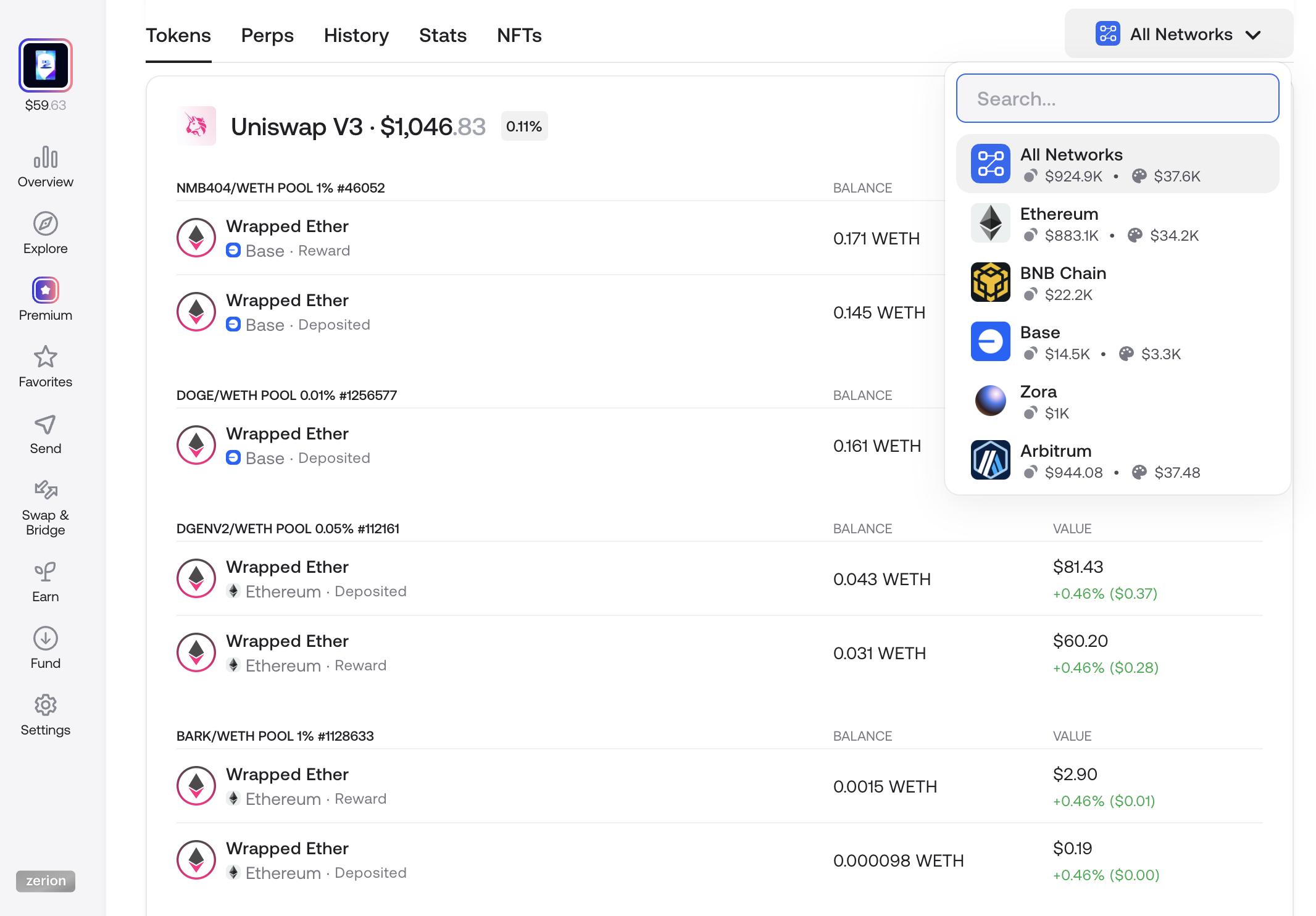
Coverage runs across 40+ EVM chains and Solana, spanning thousands of DeFi protocols. So a portfolio split between Aave on Arbitrum and a Yearn vault on mainnet resolves into a single number.
You can also take the next step and import your addresses into Zerion Wallet. This way you can track your portfolio and manage it in the same place.
The DeFi Portfolio Tracker page covers that side in more depth, and How to Track Crypto Wallet Addresses walks through the setup.
Track positions from the terminal with Zerion CLI
Zerion CLI is an open-source toolkit for AI agents, enabling them to read the same position data from the command line. Install it with one command:
npx -y zerion-cli init
The read commands cover portfolio state:
zerion positions <address|ens>    # token and DeFi positions
zerion portfolio <address|ens>    # portfolio value and top holdings
zerion analyze <address|ens>      # positions, portfolio, and transactions
zerion pnl <address|ens>          # profit and loss
That wires Zerion into Claude Code, Codex, Gemini, and 20+ other agentskills.io clients.
An agent can then answer "which of my lending positions are closest to liquidation" by calling zerion positions and reasoning over the result.
Reads work with a free API key from dashboard.zerion.io, or pay-per-call at $0.01 USDC per request through x402 on Base and Solana. The source lives at github.com/zeriontech/zerion-ai.
Track positions programmatically with Zerion API
If you're interested in tracking DeFi positions at scale, Zerion API returns all four types from the positions endpoint:
GET https://api.zerion.io/v1/wallets/{address}/positions/?filter[positions]=only_complex
The only_complex filter drops plain token balances and returns protocol positions only.
Each one carries a position_type (deposit, loan, staked, locked, reward, or liquidity) along with the resolved underlying assets and their USD value. For example, a Uniswap LP and an Aave loan come back in the same shape, so your rendering logic doesn't branch per protocol.
What this replaces is the part teams often underestimate: running indexers, writing an adapter per protocol, and backfilling chain by chain. Then maintaining all of it as protocols ship new versions.
Kraken, Uniswap Wallet, Base App, and Privy read position data this way. The DeFi Positions API guide has the full request and response walkthrough.
Which one should you use
All three read the same index. Pick the surface that fits how you work, the underlying onchain data is the same everywhere.
Check the Zerion portfolio tracker web app or create free Zerion API keys to track it with your AI agent.
FAQ
Can I track LP positions across multiple chains in one place?
Yes. Zerion resolves LP positions on 40+ EVM chains and Solana into a single portfolio view, including Uniswap v3 positions held as NFTs. Each position shows its current composition and the fees it has earned.
How do I track staking rewards that don't change my token balance?
Liquid staking tokens like stETH and jitoSOL accrue value through a rising exchange rate rather than a growing balance. Zerion prices the position against its underlying asset, so the growth appears in your portfolio value even when the balance number stays flat.
Is there an API for DeFi lending and vault positions?
Zerion API's positions endpoint returns lending, staking, LP, and vault positions in one normalized schema, filtered with filter[positions]=only_complex. Free API keys are available at dashboard.zerion.io.
Do I need to connect a wallet to track positions?
No. Both the app and the CLI accept any address or ENS name for read-only tracking. Connecting is only required if you want to act on a position rather than watch it.
What's the difference between a token balance and a DeFi position?
A balance is a token you hold directly. A position is a claim on a protocol (deposited, staked, borrowed against, or pooled), represented in your wallet by a receipt token that carries no price of its own.

Written by
Vladimir ShamanovVladimir has been working full-time in blockchain and crypto since 2018. Before that, he was in financial communications. He holds a BSc in Management from the LSE.
More from Vladimir Shamanov